
01♫
Music in your HUD
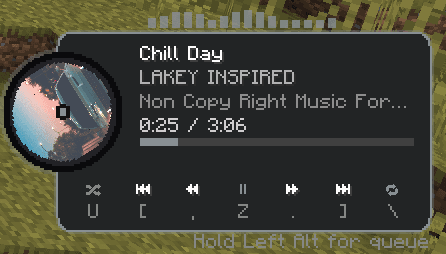
See the song, artist, album art, time, and controls without leaving your world.
SONGARTISTARTWORKTIME
MUSIC INSIDE MINECRAFT
Control your music, see lyrics, build a queue, and make the player look exactly how you want. All without tabbing out.
Your world has a soundtrack.
WHAT IT DOES
Keep your music close without covering your game. Turn on what you want, move it where you want, and hide it when you do not.
See the song, artist, album art, time, and controls without leaving your world.
Use Spotify, Apple Music, YouTube Music, SoundCloud, or music playing in your browser.
Pick the player style, colors, opacity, position, album art shape, and animations.
Show synced lyrics while you play. Move them around and change how they look.
Pause, skip, go back, shuffle, repeat, and view what is playing next.
Hide song info, artwork, lyrics, stats, and presence with streamer mode.
Turn on audio bars and visuals that move with your music.
Keep track of your listening and save setups for different ways you play.
IN GAME
Click a picture to swap the big preview.
GET READY